
TL;DR – Key Takeaways
- AI crawlability is your website’s ability to be accessed, read, and understood by AI-powered search engines like ChatGPT, Perplexity, and Google’s AI Overviews.
- About 1 in 5 Google searches now trigger an AI-generated summary – and that number is climbing fast. If AI bots can’t crawl your site, you’re invisible in these results.
- Broken links, misconfigured robots.txt files, JavaScript-heavy pages, and missing structured data are the biggest blockers of AI crawlability.
- Regular audits with tools like WizardsTool’s broken link checker and the AI Visibility Tool extension help you catch and fix issues before they cost you traffic.
- Good AI crawlability starts with the same fundamentals that make any site healthy: clean links, clear structure, fast loading, and semantic HTML.
Your content might rank on page one of Google. It might even sit in the top three organic results. But here’s the thing – none of that guarantees your site shows up when someone asks ChatGPT a question, gets an answer from Perplexity, or sees a Google AI Overview at the top of their search.
AI-powered search is already reshaping how people find information. And it runs on a different set of rules.
A Pew Research Center study tracking over 68,000 Google searches found that roughly 18% of all searches in March 2025 produced an AI-generated summary. When users saw one of these summaries, they clicked on traditional search results just 8% of the time – nearly half the 15% click rate on pages without AI summaries.
That shift isn’t slowing down. It’s accelerating. And the sites that AI bots can’t properly crawl? They simply don’t exist in this new layer of search.
That’s what AI crawlability is about – and why it matters right now for anyone who depends on organic traffic.
What Is AI Crawlability?
Crawlability has always been foundational to SEO. In the traditional sense, it’s about whether Googlebot can access your pages, follow your links, and index your content. If Google can’t crawl it, it can’t rank it.
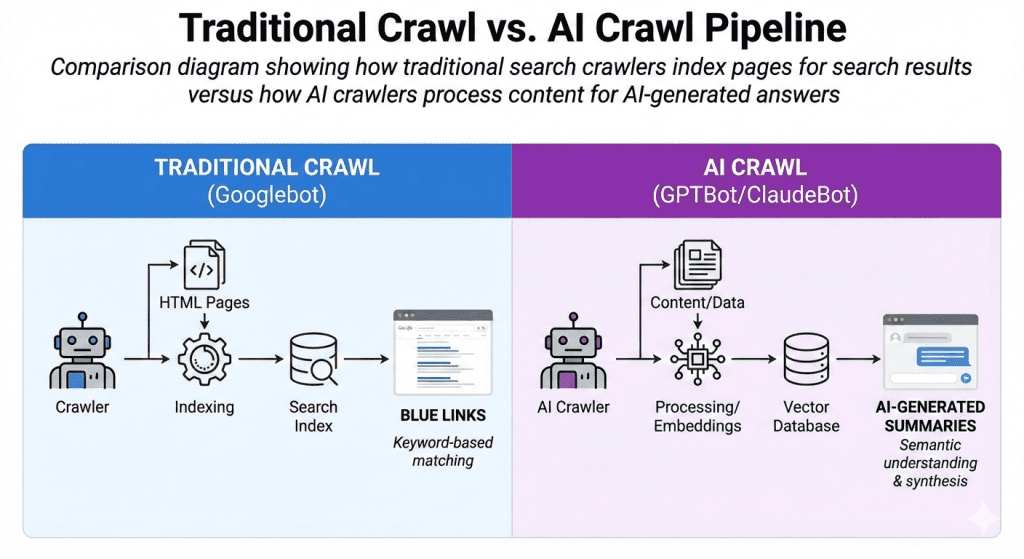
AI crawlability extends that same concept to a new generation of bots. We’re talking about crawlers like OpenAI’s GPTBot, Anthropic’s ClaudeBot, PerplexityBot, Google-Extended, and others that power the AI search engines and answer tools millions of people now use daily.
But there’s an important difference. Traditional search crawlers index your pages so they can appear as blue links in search results. AI crawlers go further – they’re reading, interpreting, and synthesizing your content so it can be quoted, cited, or summarized inside AI-generated responses. They’re not just indexing where your content lives; they’re trying to understand what it says and whether it’s trustworthy enough to reference.
As the team at Linkflow put it: “A page ranking #1 in Google may have zero visibility in ChatGPT responses. Conversely, content that ranks on page 3 of Google might be heavily cited by AI systems due to its structure and clarity.”
That’s a fundamental shift. And it means crawlability alone isn’t enough anymore – your content also needs to be structured and readable enough for AI systems to extract meaning from it.
AI Bots vs. Traditional Search Crawlers – What’s Different?
If you’ve been doing SEO for a while, you’re already comfortable with Googlebot and Bingbot. AI bots share some DNA with these crawlers, but they behave differently in several key ways.
They Don’t All Render JavaScript
Most AI crawlers don’t execute JavaScript the way Googlebot does. If your site relies heavily on client-side rendering – say, a React or Vue single-page application that loads content dynamically – many AI bots will see a mostly blank page. As ResultFirst notes, “most AI crawlers don’t render JavaScript,” so content that loads dynamically through scripts may be completely invisible to them.
For AI crawlability, server-side rendering (SSR) or static HTML is strongly preferred.
They Have Their Own User Agents
Each AI company operates its own crawlers with specific user-agent strings. The major ones you’ll encounter include:
- GPTBot – OpenAI’s crawler for training data
- OAI-SearchBot – OpenAI’s search-specific crawler
- ChatGPT-User – Fetches pages when users ask ChatGPT to browse
- ClaudeBot – Anthropic’s crawler for Claude
- PerplexityBot – Powers Perplexity’s AI search
- Google-Extended – Google’s control token for AI training (separate from Googlebot)
- Applebot-Extended – Apple’s AI training crawler
- Bytespider – ByteDance’s crawler (behind TikTok’s AI features)
Each of these respects (or should respect) your robots.txt directives – but only if you’ve actually configured rules for them.
They Crawl Aggressively
One thing site owners discover the hard way is that some AI bots crawl much more aggressively than traditional search bots. There have been widely reported cases of ClaudeBot and Bytespider hitting sites with so many requests that it felt like a DDoS attack. According to Cloudflare’s data, Bytespider, Amazonbot, ClaudeBot, and GPTBot are the four highest-volume AI crawlers on their network.
If your server is slow or your site has thousands of broken redirect chains, aggressive AI crawling can compound the problem – eating up your crawl budget and server resources while failing to actually index your content properly.
How Broken Links Hurt Your AI Crawlability
Here’s where this gets directly relevant if you’re maintaining a website and not thinking about link health.
Broken links don’t just create a bad user experience or hurt your traditional SEO. They actively sabotage AI crawlability in several ways.
Dead Ends for AI Crawlers
When an AI bot follows a link on your site and hits a 404, that’s a dead end. The bot can’t access whatever content was supposed to be there, which means it can’t include that information when building its understanding of your site. Multiply that by dozens or hundreds of broken links, and AI systems develop an incomplete – or worse, inaccurate – picture of what your site offers.
Wasted Crawl Budget
AI bots allocate a certain amount of time and resources to crawling any given site. Every request spent on a broken link is a request not spent on your actual content. If a significant portion of your internal links point to dead pages, AI crawlers may give up on your site before they even reach your most valuable content.
Broken Redirect Chains
A link that redirects once is fine. A link that chains through three or four redirects before landing somewhere – or worse, redirects into a loop – is a crawlability killer. Some AI bots are less patient with redirect chains than Googlebot is. A chain that technically resolves for Google might just time out for GPTBot or ClaudeBot.
Damaged Site Structure Signals
AI systems rely heavily on internal link structure to understand how your content relates to itself. Which pages are most important? How do topics connect? Broken internal links fracture that structure. If your pillar page about “email marketing” has five broken links to supporting articles, AI crawlers lose context about the depth of your expertise on that topic.
This is one of the reasons running regular broken link audits matters more than ever. A tool like WizardsTool’s broken link checker crawls up to 3,000 URLs per scan, catching dead outbound links, broken internal links, and redirect issues – all of the things that quietly degrade your AI crawlability over time. You can also use WizardsTool’s Chrome extension to check individual pages as you browse.
Other Technical Factors That Block AI Crawlers
Broken links are one of the most common offenders, but they’re far from the only thing that can keep AI bots from properly reading your site.
Misconfigured robots.txt
Your robots.txt file is the front gate for every crawler that visits your site. If you haven’t explicitly addressed AI bots, you might be blocking them without realizing it – or letting them in when you’d rather not.
Please check your robots.txt, you might blocking AI bots!
A growing number of sites have started blocking AI crawlers entirely. According to Cloudflare’s analysis, AI bots accessed around 39% of the top one million websites in June 2024, but only about 3% of those sites had taken steps to block or challenge the requests.
If you want AI crawlers to access your content (and for most sites seeking visibility, you probably do), make sure your robots.txt isn’t inadvertently blocking them. Check for overly broad Disallow rules that might catch AI user agents.
On the flip side, if you have content you’d rather keep out of AI training data, you can selectively block specific bots while allowing others. For example, you could block training-focused bots like GPTBot and ClaudeBot while keeping search-focused bots like OAI-SearchBot and PerplexityBot allowed.
JavaScript-Dependent Content
This deserves repeating because it’s such a widespread problem. If the main content of your page only appears after JavaScript executes, most AI crawlers won’t see it. That includes dynamically loaded text, tabs that require clicks to expand, and content loaded via AJAX calls.
The fix is straightforward: make sure your critical content is present in the initial HTML that the server delivers. Server-side rendering, pre-rendering, or static site generation all solve this problem.
Missing or Broken Structured Data
Schema markup acts like a cheat sheet for AI bots. It clearly labels what your content is about – whether it’s an article, a product, a FAQ, a how-to guide, or a local business. Without it, AI crawlers can still read your page, but they have to work harder to interpret it.
As The HOTH explains: “If schema markup isn’t present, AI tools and bots can still read your site, but it’s much more difficult. For example, if an LLM comes across the word apple, it won’t know if you mean the fruit or Apple the company without additional context.”
Make sure your schema markup is valid, relevant, and actually implemented on your key pages. Common types that help AI bots understand your content include Article, FAQPage, HowTo, Product, Organization, and BreadcrumbList.
Slow Server Response Times
AI bots are impatient. If your server takes too long to respond, many AI crawlers will simply move on. This is especially true during heavy crawling sessions where a bot might be trying to access hundreds of your pages in a short window.
Keep your server response time (TTFB) under 200ms if you can. Caching, a good CDN, and optimized hosting all help here.
Poor Internal Linking
If your best content is buried four or five clicks deep from your homepage, AI crawlers may never find it. A flat site architecture where important pages are reachable within two to three clicks gives bots (and users) the best chance of discovering everything valuable on your site.
How to Audit Your Site for AI Crawlability
Knowing the theory is good, but running an actual audit is what moves the needle. Here’s a practical workflow you can follow.
Step 1: Check Your Broken Links
Start with the foundation. Run your entire site through WizardsTool’s broken link checker to identify dead internal links, broken outbound links, and redirect problems. Export the results to CSV, prioritize the pages with the most inbound links, and fix them first. Pages that are linked to most often carry the most weight – both for traditional SEO and AI crawlability.
Step 2: Audit Your robots.txt
Check with tool or
Pull up your robots.txt file (yourdomain.com/robots.txt) and review what you’re allowing and disallowing. Check specifically for rules addressing GPTBot, ClaudeBot, PerplexityBot, and other AI user agents. Decide intentionally which bots you want to allow and which you want to restrict.
Step 3: Run an AI Visibility Audit
Use the AI Visibility Tool extension to scan your key pages. This Chrome extension runs a focused audit covering AI crawlability for major AI bots, structured data validation, content quality metrics, semantic HTML structure, and overall AI readiness. It gives you a single score plus detailed breakdowns for technical, content, and semantic issues – and you can export the full report for your team.
Step 4: Test JavaScript Rendering
Check whether your important content is visible without JavaScript. The simplest way: open Chrome DevTools, disable JavaScript (Settings > Debugger > Disable JavaScript), and reload your page. If your main content disappears, AI bots probably can’t see it either.
Step 5: Validate Your Structured Data
Run your URLs through Google’s Rich Results Test or Schema.org’s validator to make sure your markup is error-free. Look especially for Article, FAQPage, Organization, and BreadcrumbList schemas on your most important pages.
Step 6: Review Your Internal Link Structure
Check that your most valuable pages are no more than two to three clicks from the homepage. Look for orphan pages (pages with no internal links pointing to them) and make sure your topic clusters are connected with clear, relevant internal links.
Making AI Crawlability Part of Your Routine
AI crawlability isn’t a one-time fix. It’s an ongoing part of site maintenance – just like checking for broken links or updating your sitemap.
Here’s a reasonable cadence:
- Weekly: Quick broken link check on your most important pages using the WizardsTool Chrome extension
- Monthly: Full site crawl with WizardsTool to catch new broken links, redirects, and crawl errors
- Monthly: Run the AI Visibility Tool audit on your top 10-20 pages
- Quarterly: Review robots.txt for new AI user agents you may need to address
- Quarterly: Validate structured data and check for new schema opportunities
The websites that stay visible in AI search won’t be the ones with the best content alone – they’ll be the ones whose content is actually accessible to AI systems. Clean link structures, proper technical configuration, and regular audits are what separate sites that get cited in AI responses from those that get ignored entirely.
And in a world where about 1 in 5 Google searches already produce an AI summary – and users who see those summaries click through to websites at half the normal rate – being invisible to AI isn’t a future problem. It’s costing you traffic right now.
Leave a Reply